Microlearning examples: Small modules, better knowledge retention

e-Learning developer & Customer Success Coach at FLOWSPARKS
Looking for practical microlearning examples that make learning actually stick? You've come to the right place. Social media has fundamentally reshaped how we consume knowledge. Platforms like YouTube, Instagram, and TikTok make information instantly accessible and bite-sized, and that changes how learners expect training to work. In fact, over 73% of the US population were active on social media in 2025.
Because social media encourages frequent, short interactions with content, people increasingly prefer quick, on-demand learning over long, formal lessons. Moreover, educational research confirms that social media-inspired formats: short videos, interactive posts, and microunits, which enhance engagement, motivation, and collaboration. Specifically, these formats align with how modern learners naturally consume knowledge every day.
Enter microlearning.
Whether you're creating onboarding courses for new hires who need immediate support, or giving long-time employees a refresher training on updated procedures, microlearning is the format that keeps people moving. In other words, it's the backbone of modern learning, and it's no longer just a buzzword.
From an instructional design perspective, microlearning offers clear advantages. For example, it reduces cognitive load by breaking complex topics into manageable chunks. Additionally, it supports spaced repetition for better long-term retention. As a result, learners can access just-in-time knowledge exactly when they need it, without feeling overwhelmed.
In this article, we explore what microlearning is, why it works, what challenges to expect, and, most importantly, ten practical microlearning examples you could create with FLOWSPARKS. Let's get into it.
What is microlearning?
Microlearning is the art and science of delivering training in small, focused chunks. Instead of a 45-minute module, you offer a 3-minute module. Instead of a 20-slide click-through, you offer a quick scenario, a checklist, or a single practice question. In other words, it's about delivering exactly the right knowledge at exactly the right moment. Nothing more, nothing less.
Microlearning is:
- Short, typically 2-7 minutes
- Focused on one single learning objective
- Easy to digest and easy to find later
- Mobile-friendly
- Designed to fit into the flow of work
Think of microlearning as the opposite of dumping everything into one giant onboarding module and hoping for the best. Rather than overwhelming learners with information, it gives them exactly what they need, precisely when they need it.
Why microlearning works
The learning theory behind it
Microlearning is grounded in three well-established learning theories. Together, they explain why short, focused modules consistently outperform long, information-heavy ones. Each of these theories also underpins the microlearning examples you'll find later in this article, so it's worth understanding the 'why' before diving into the 'what'.
Ebbinghaus's Forgetting Curve
This theory shows that people forget a large percentage of new information shortly after learning it. Consequently, microlearning combats this by delivering content in small, spaced-out chunks. As a result, learners retain far more over the long term than they would from a single, dense training session.
Cognitive Load Theory
Because there is a hard limit to what our working memory can handle at once, overwhelming learners with too much information at once is counterproductive. Therefore, microlearning breaks complex topics into short, focused modules, reducing cognitive load and making it significantly easier to absorb and apply new knowledge.
Constructivism
According to constructivist theory, learners build new knowledge by connecting it to what they already know. Rather than passively reading or listening, learners in well-designed microlearning actively construct their own understanding through scenarios, dilemmas, and collaborative activities.
Pros & cons of microlearning
Although microlearning has proven its effectiveness, it also comes with real challenges. However, knowing those challenges upfront helps you design better from the start. That said, here's an honest overview of both sides before you explore the microlearning examples below:
✅ Pros
- Faster onboarding: new hires get exactly what they need, when they need it.
- Higher completion rates: short means doable, and doable means effective.
- Better retention: smaller chunks spaced over time stick better than marathon sessions.
- Adapted to real workflows: learners complete it on mobile, between tasks.
- Easier to update: small modules mean faster iteration for compliance or process changes.
- Learner-driven: learners focus on core knowledge without scrolling past irrelevant content.
- Current: people increasingly prefer quick, on-demand learning over long, formal lessons.
⚠️ Cons
- 'Micro' doesn't mean 'random': microlearning still needs structure and learning paths.
- Hard to get SMEs to focus: keeping content small and sharp requires negotiation skills.
- Risk of fragmentation: too many micro-modules can turn your LMS into an unnavigable jungle.
- Not suitable for ALL learning: deep conceptual topics sometimes need longer formats.
- Quality over quantity: it's easy to produce microlearning. It's harder to produce good microlearning.
10 microlearning examples to inspire your next course
Below you'll find ten practical microlearning examples created with FLOWSPARKS. Additionally, these examples span a wide range of formats and use cases, so feel free to use them as direct inspiration for your own programs.
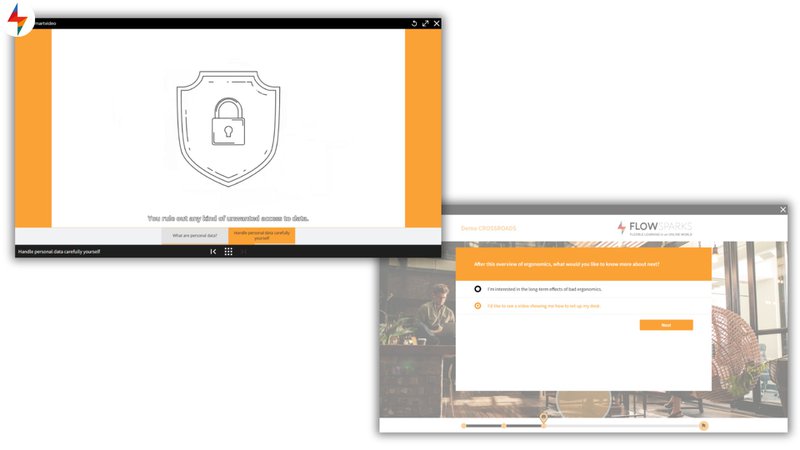
1. A 3-minute 'First Day Basics' onboarding module
First impressions matter, and this short, mobile-friendly module makes them count. It welcomes new hires and immediately gives them the essentials:
- Office access
- Communication channels
- Who to contact for what
- First practical tasks
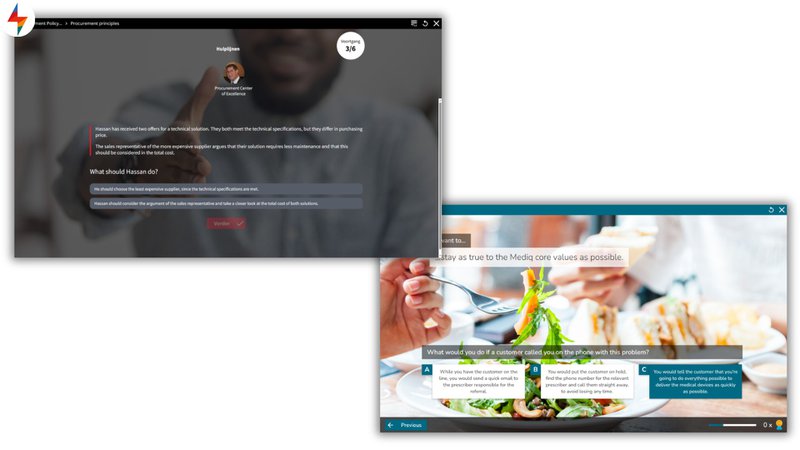
2. A quick scenario to practice customer objections
Sales teams practice responding to real objections in a branching scenario. For example, learners might face: 'Too expensive', 'Not the right time', or 'I'm not the decision maker'. They pick an answer and see instant feedback. As a result, the learning sticks far more than reading a tip sheet ever would.
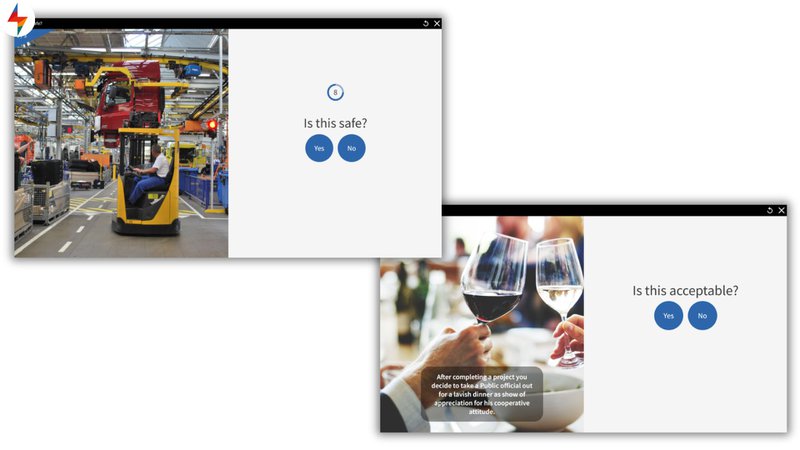
3. A 1-minute compliance refresher
A single 'Do or Don't?' question about GDPR, safety, or ethics. Because it takes only 60 seconds, completion rates are through the roof. Additionally, the format is so lightweight that learners have no reason to skip it.
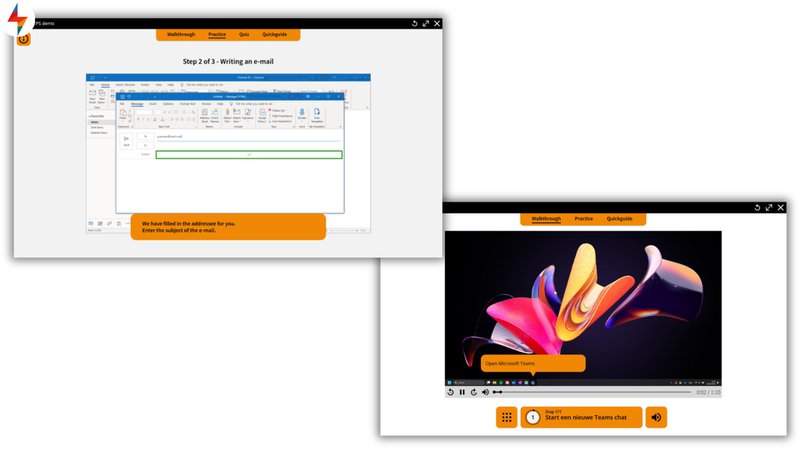
4. A step-by-step workflow guide
Especially useful for onboarding contractors or temporary workers who need to hit the ground running. Topics typically include:
- Completing a service ticket step by step
- Using a specific tool or program
- Operating the equipment safely
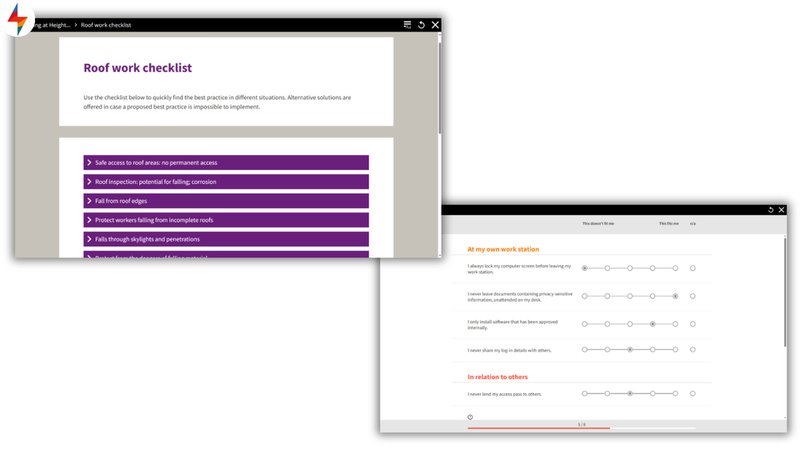
5. A microlearning checklist
Simple, practical, and immediately usable. For instance:
- 'Start-of-shift checklist'
- '5 steps before calling a customer'
- 'Quality checklist for packaging'
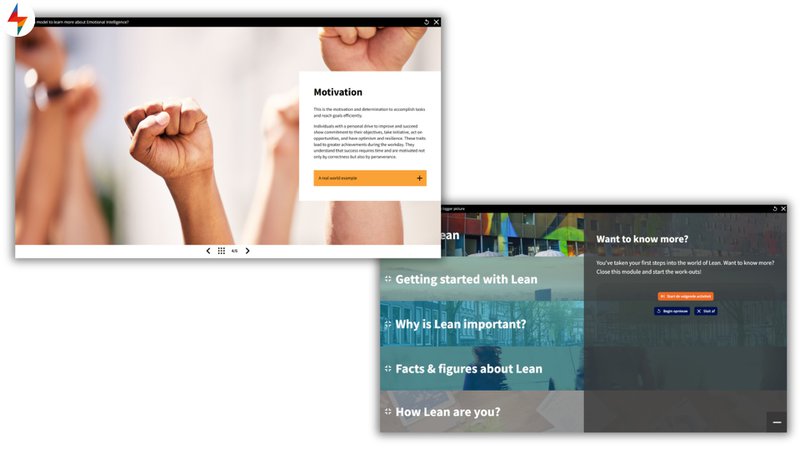
6. A 2-minute 'What's new?' update
Perfect for product updates, software releases, or process changes. Furthermore, these modules are quick to produce and even quicker to complete. Also, because they're short and focused, teams can stay informed without carving out a full training day.
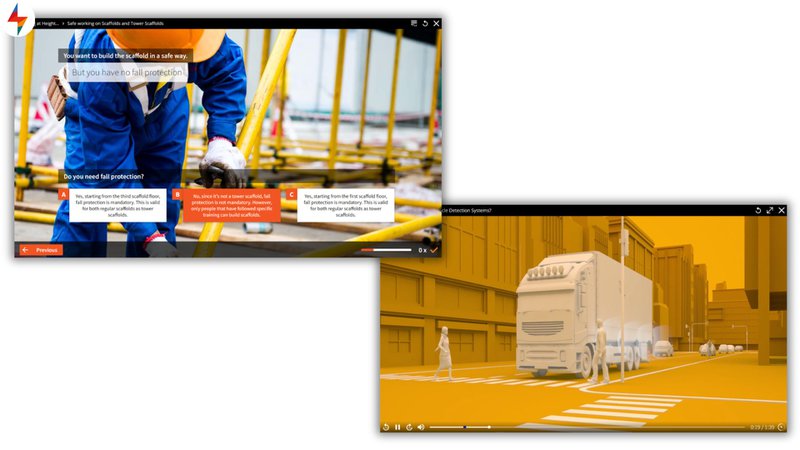
7. A microlearning safety scenario
A worker enters an unfamiliar situation and must decide how to handle a safety issue. Particularly effective in high-risk environments. Because wrong decisions have real consequences here, scenario-based practice is far more valuable than a static information sheet.
8. A flashcard-based refresher
Ideal for medical, safety, technical, or customer service training. Additionally, flashcards are easy to revisit on mobile at any moment. Naturally, this supports spaced repetition, which is one of the most evidence-backed techniques for long-term knowledge retention.
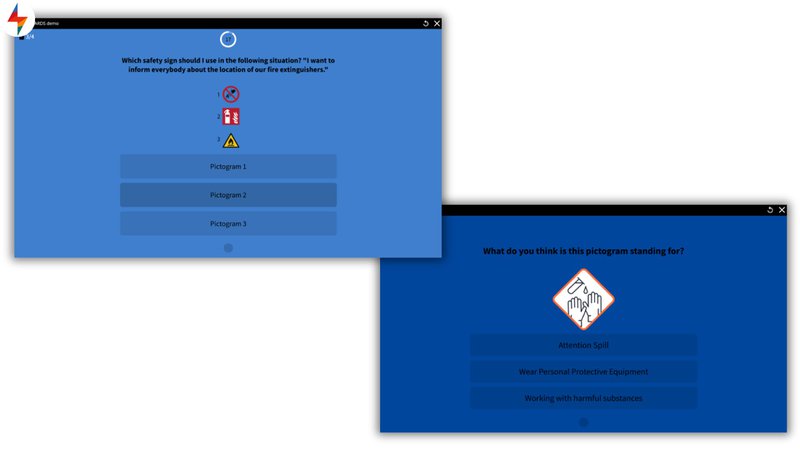
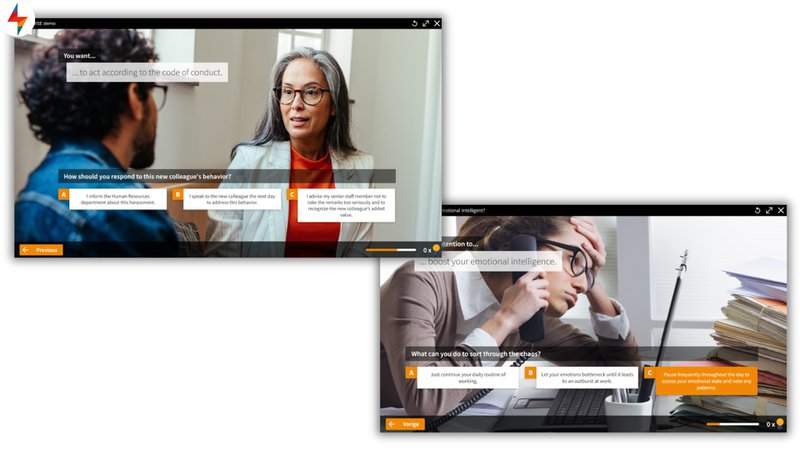
9. A quick 'Choose the best response' module
One dilemma. Three answer options: good, better, or best. Rather than simply memorising facts, learners must think critically and justify their choice. Afterwards, this kind of module often sparks great discussion within teams.
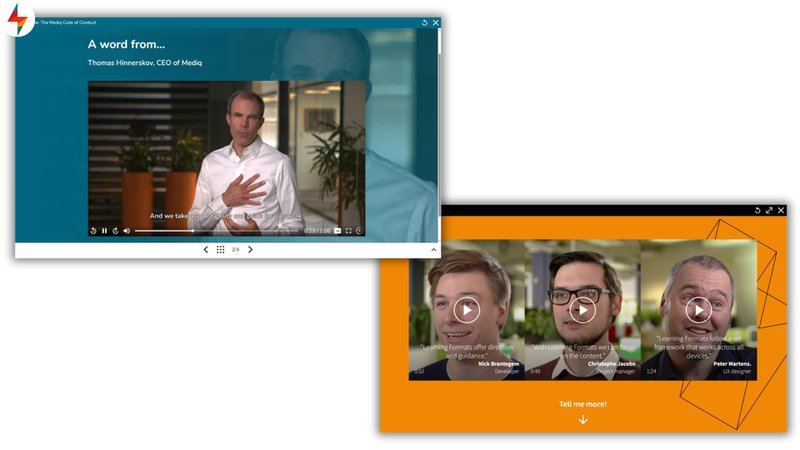
10. A micro-coaching moment
A short video from a manager or coach, followed by one reflection question. Similar to the scenario format, this approach puts the learner in a reflective mindset.
Microlearning use cases
While short modules can be created for most topics, certain use cases are especially well suited to microlearning. Typically, these are situations where employees need quick, focused support to improve performance, refresh knowledge, or apply skills directly in their daily work. The microlearning examples in the previous section give a good sense of which formats fit each use case best.
1. Onboarding
Onboarding is one of the strongest use cases for microlearning. Because new employees experience their first weeks at high speed, reducing cognitive overload is critical. Additionally, microlearning fits naturally into real workdays and enables phased, just-in-time learning. Typical topics include company values, first-day essentials, tools, and safety basics.
2. Onboarding contractors
Contractors need to get up to speed fast and skip unnecessary corporate overhead. Because their engagement windows are short, a lean, role-specific approach works best. Therefore, microlearning is the ideal format, covering process templates, access rules, equipment instructions, and compliance checks efficiently.
3. Refresher training
Refresher training is about reinforcing and reactivating existing knowledge rather than relearning everything from scratch. Accordingly, microlearning fits perfectly because it delivers short, focused reminders exactly when they're needed. Think compliance updates, safety reminders, product updates, and seasonal procedures.
4. Performance support
Performance support is about helping employees do the job right at the moment of need. Because pulling people away from their work is costly, microlearning delivers concise, actionable guidance in the flow of their day. For example, job aids, safety checklists, quick demos, and 'how to handle this?' scenarios all work extremely well here.
5. Communication & change management
Change initiatives succeed when employees understand, remember, and act on key messages. Because microlearning delivers short, clear, and actionable content, it sticks far better than a long PDF or all-hands email. Additionally, cultural nudges (brief reminders of how things are done) are one of the most underrated formats in this category.
Best practices to make your microlearning strategy deliver
Microlearning only works when it's designed with intention. However, it's easy to fall into the trap of making lots of content that doesn't actually connect. Here are seven principles we’ve learned from making microlearning work inside organizations:
1. Focus on ONE clear learning objective
If you find yourself saying 'and also…'? Turn that into a second microlearning. One module, one goal. Without that discipline, content quickly becomes unfocused and learners leave without a clear takeaway.
2. Keep it short, but meaningful
Although microlearning is brief, it doesn't have to be shallow. As long as it's rooted in a real, relevant situation, even a 2-minute scenario can deliver a powerful and lasting learning moment.
3. Use real moments from the workflow
Because microlearning sticks better when it mirrors real life, draw on real mistakes, real customer questions, and real issues people face every day. The more recognisable the situation, the more the learning transfers directly back to the job.
4. Make microlearning searchable
Although employees won't remember everything, they should be able to find everything easily. For instance, a clearly labelled content catalogue lets learners access the right support on the job, exactly when it's needed most.
5. Blend microlearning into a broader learning journey
Although microlearning is powerful, it's not the whole answer. Therefore, combine it with field assignments, coaching, job shadowing, and live Q&A sessions. For example, a strong onboarding journey might use microlearning for knowledge and scenarios, then coaching for application and reflection.
6. Use a mix of formats
Instead of defaulting to text-and-image or just quizzes, vary your approach. Use scenarios, checklists, short videos, and interactive moments to keep things fresh. For inspiration, revisit the microlearning examples listed earlier in this article.
7. Reuse microlearning for refresher training
Turn your onboarding content into quarterly or seasonal refreshers. As a result, you get significantly more value from content you've already invested in, without starting from scratch every time a process changes.
Top microlearning platforms
Although there are many platforms to choose from, not all of them are built equally. Instead of choosing based on trends, pick based on your specific goals and your team's way of working. The right platform makes building microlearning examples like the ones in this article fast, consistent, and scalable:
1. FLOWSPARKS
FLOWSPARKS is built for organisations that want to create their own microlearning quickly without compromising on instructional quality. While many platforms in this category focus mainly on delivering off-the-shelf content or reinforcement with limited authoring possibilities, FLOWSPARKS gives learning teams the tools to turn internal expertise into short, effective learning modules grounded in instructional design principles and designed to make knowledge stick.
FLOWSPARKS supports learning teams in translating internal expertise into structured, reusable microlearning for workplace needs such as onboarding, refresher training, compliance, performance support and more. Rather than starting from scratch each time, authors can work with ready-made building blocks for scenarios, dilemmas, checklists, flashcards, and other proven learning interactions. This allows teams to create effective modules efficiently while staying true to sound instructional design principles.
FLOWSPARKS can be used in different ways depending on your setup. You can use it as a standalone authoring solution, integrate it with your existing LMS, or use the built-in FLOWSPARKS LMS as a flexible and cost-efficient alternative for audiences that often fall outside the main company LMS, such as contractors, external workers, partners, or customers.

Advantages
✅ User-friendly authoring tool with AI support to speed up the creation process. Makes it easy to create microlearning grounded in instructional design principles
✅ Combines an LMS and authoring tool in one platform, no need to juggle separate tools.
✅ Ready-made microlearning formats (scenarios, flashcards, checklists, dilemmas) out of the box.
✅ Strong mobile-first experience, ideal for field workers and deskless employees.
✅ Suitable for various sectors, from manufacturing and retail to healthcare and professional services.
✅ Scales easily across large, distributed workforces in multiple languages
Disadvantages
❌ Less suitable for teams looking for a highly open-ended authoring environment with full custom design freedom
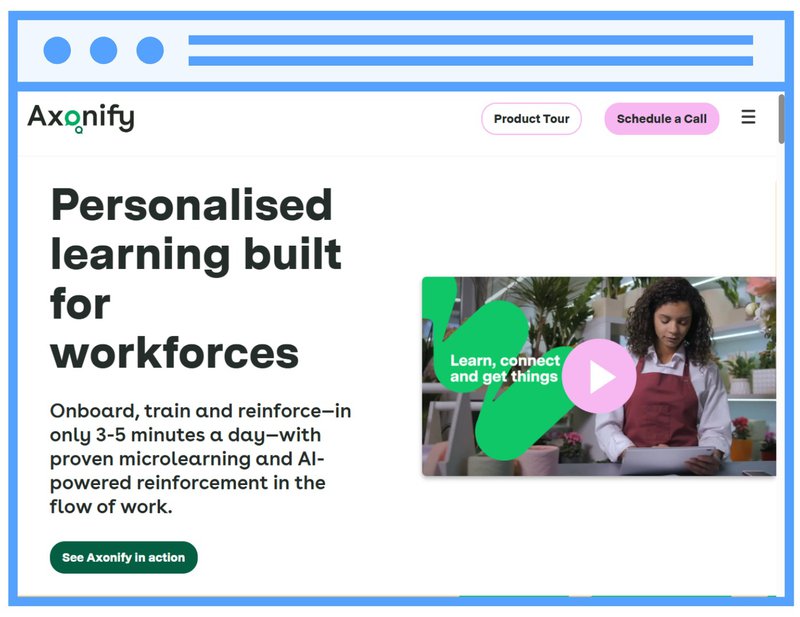
2. Axonify
Axonify is built for large frontline workforces: think retail, logistics, manufacturing, and healthcare. Rather than one-off training events, it focuses on daily reinforcement: short bursts of learning delivered every shift, powered by an algorithm that adapts to what each employee knows and what they keep forgetting. If your biggest challenge is getting floor staff to retain safety procedures or product knowledge over time, Axonify is built exactly for that problem.
Advantages
✅ Adaptive algorithm that personalises content based on individual knowledge gaps.
✅ Strong spaced repetition engine
✅ Scales easily across large, distributed workforces.
Disadvantages
❌ Less suited for knowledge workers or complex, scenario-heavy content.
❌ Authoring capabilities are limited: you’ll likely need an external tool to create richer content.
3. EdApp
EdApp (now part of SafetyCulture) is a mobile-first microlearning platform designed for deskless and distributed teams. It offers a library of ready-made courses, making it a low-barrier entry point for organisations just getting started with microlearning.

Advantages
✅ Strong mobile-first experience, ideal for field workers and deskless employees.
✅ Built-in gamification features to boost engagement and completion rates.
Disadvantages
❌ Limited scenario-building and advanced authoring options compared to dedicated tools.
❌ Complex LMS integration
Features to look for
When evaluating any platform, prioritise these features:
- Templates for fast content creation
- Scenario-based learning options
- Mobile-first output
- Adaptive learning paths
- Built-in quizzes and dilemmas
- Analytics on completion and performance
- Spaced repetition options
- Content reuse and version control
- Integration with your LMS or LXP
- Easy on-the-job access
Not every platform is built to cover this full set of requirements. Some specialise in only a few features, while more complete platforms such as FLOWSPARKS combine mastery of all of these features.
How to choose the right microlearning platform
Because so many options exist, it can be tough to know which platform will best meet your needs. Here is a 6-step process to help you evaluate platforms systematically, so you select a solution that genuinely fits your goals, team, and content strategy. After all, the best platform is the one that helps you build microlearning your learners will actually use.
Step 1: Define your core use case
Is your focus onboarding, contractors, compliance, or performance support? Because different needs require different platforms, defining your primary use case is the essential starting point. Consequently, you'll avoid paying for features you don't need while getting the ones you actually do.
Step 2: Choose your authoring style
Look closely at how the platform supports authors. Some tools make production fast, but rely on rigid structures that often lead to repetitive, one-size-fits-all learning. Others offer complete design freedom, but require more time, expertise, and governance to keep quality consistent. FLOWSPARKS strikes a different balance by embedding instructional design principles into the authoring process, helping teams create varied, effective digital learning efficiently and consistently.
Step 3: Consider your team's skill set
Even if a platform has impressive features, it won't deliver results if your team struggles to use it daily. Therefore, consider the technical abilities, instructional design experience, and time your team can realistically invest. A platform that matches your team's skills ensures quick adoption and real output.
Step 4: Test with a real microlearning scenario
Instead of relying on a generic demo, test the platform using your actual content. Only then will you get a true sense of how it handles your specific needs, formats, and workflows.
Step 5: Check scalability
Think 6-12 months ahead. Will you create 20 microlearnings a year or 200? Beyond that, assess whether the platform supports larger learning modules and structured learning paths. Also, check whether it handles blended or hybrid delivery options as your programme grows.
Step 6: Evaluate analytics
Look at performance data, behaviour change indicators, and reinforcement tracking. Simply put, data tells you whether learning is actually happening, not just whether people clicked through.
Final thought
Because microlearning meets the real needs of modern learners, it has proven its effectiveness time and again. By delivering content in short, focused bursts, it aligns with how our brains absorb and retain information. Moreover, its flexibility allows learners to access training anytime and anywhere. Unlike one-off training events, microlearning supports continuous development and real performance improvement over time.
Whether you're looking at a compliance refresher, a new hire welcome module, or a quick scenario for your sales team, the microlearning examples in this article show just how versatile this approach can be. In short, microlearning works because it's efficient, learner-centred, and results-driven, and that's exactly why it's here to stay.
Ready to turn internal expertise into digital learning that sticks? Discover how FLOWSPARKS helps you create effective microlearning quickly, grounded in instructional design principles and tailored to real workplace needs. Book a personalised demo here to see what that looks like for your organisation.
FAQ about microlearning examples
1. Isn't microlearning just 'short content'?
Although microlearning is brief, it's not simply about cutting a long lesson into smaller pieces. Rather, its power comes from being tightly focused on a single objective and grounded in meaningful, real-world application. Every module needs to earn its place.
2. Can microlearning replace full training programs?
Although microlearning is excellent for quick skills, refreshers, and performance support, it shouldn't stand alone for complex topics. However, it works brilliantly as part of a blended approach. Instead of replacing deeper learning, it supports and reinforces it, making the overall programme more effective.
3. How do I start with microlearning?
First, identify the friction points in your training: the moments where learners struggle most. Then turn those into small, focused modules. From there, use templates to keep production fast and consistent, and build your library step by step.
4. What do microlearning examples look like in practice?
Depending on your learning goal, the format will vary. For instance, here are some of the most effective microlearning examples you can create:
- A 2-minute branching scenario
- A 5-step checklist
- A one-question refresher quiz
- A short, animated explainer
- A dilemma with three possible responses
- A quick 'what's new' product update
All of these are clean, focused, and easy to consume, often on mobile, in under five minutes.
.avif)
Are you looking to step up your digital training efforts
inside your organization?
Schedule a demo and discover how FLOWSPARKS helps create and deliver engaging e-Learning experiences backed by strong instructional design principles in multiple languages without a hassle.
More interesting reads
.avif)
Best learning management systems in 2026: a practical guide to choosing the right one

Top 10 e-Learning authoring tools in 2026 (ranked for real behavior change)